
The ezeep trial runs for 14 days. This guide explains how to choose a paid plan and manage your subscription and billing details in the Admin Portal.
Are you ready to subscribe to one of our plans?
- Go to the ezeep Admin Portal and login with your credentials
- Scroll down to "Subscription" on the left pane
- Click "Manage Subscription"
- Go to Payment Methods and enter your contact and billing information.
- Go back to the "Manage Subscription" window and select your current subscription.
- Navigate to "Edit Subscription".
- Click "Change"
- Choose any of our plans and select if you want to be billed monthly or annually.
- Review your Order, and add more users if you need to.
- Click "Update Subscription"
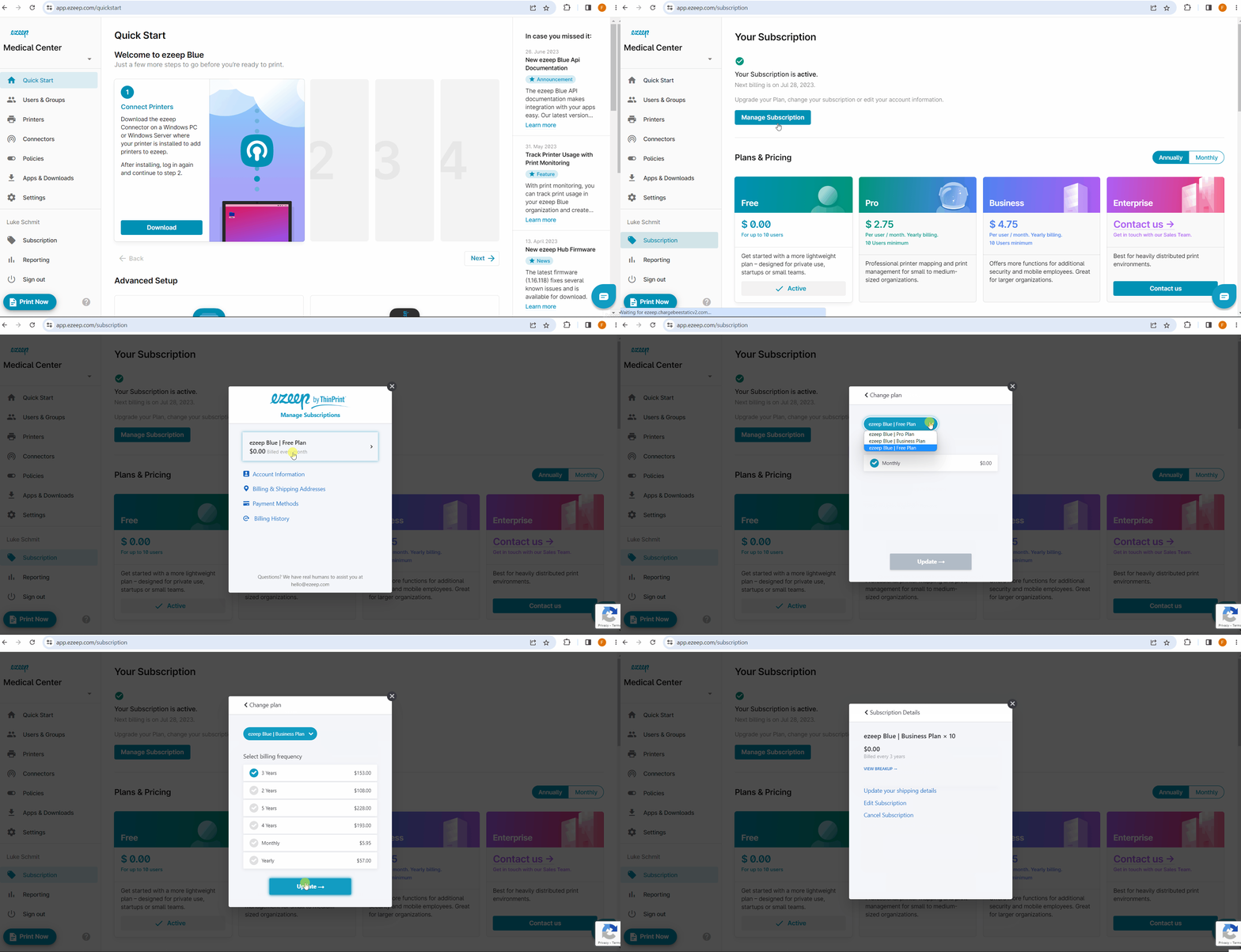
All done! You can continue printing and use the features of the plan you chose!
Note: need more features? You can change plans at any time, even after you have subscribed.