Print from supported Microsoft 365 web applications using ezeep. If you need printer access first, see Assigning Network Printers.
Install ezeep Add-In
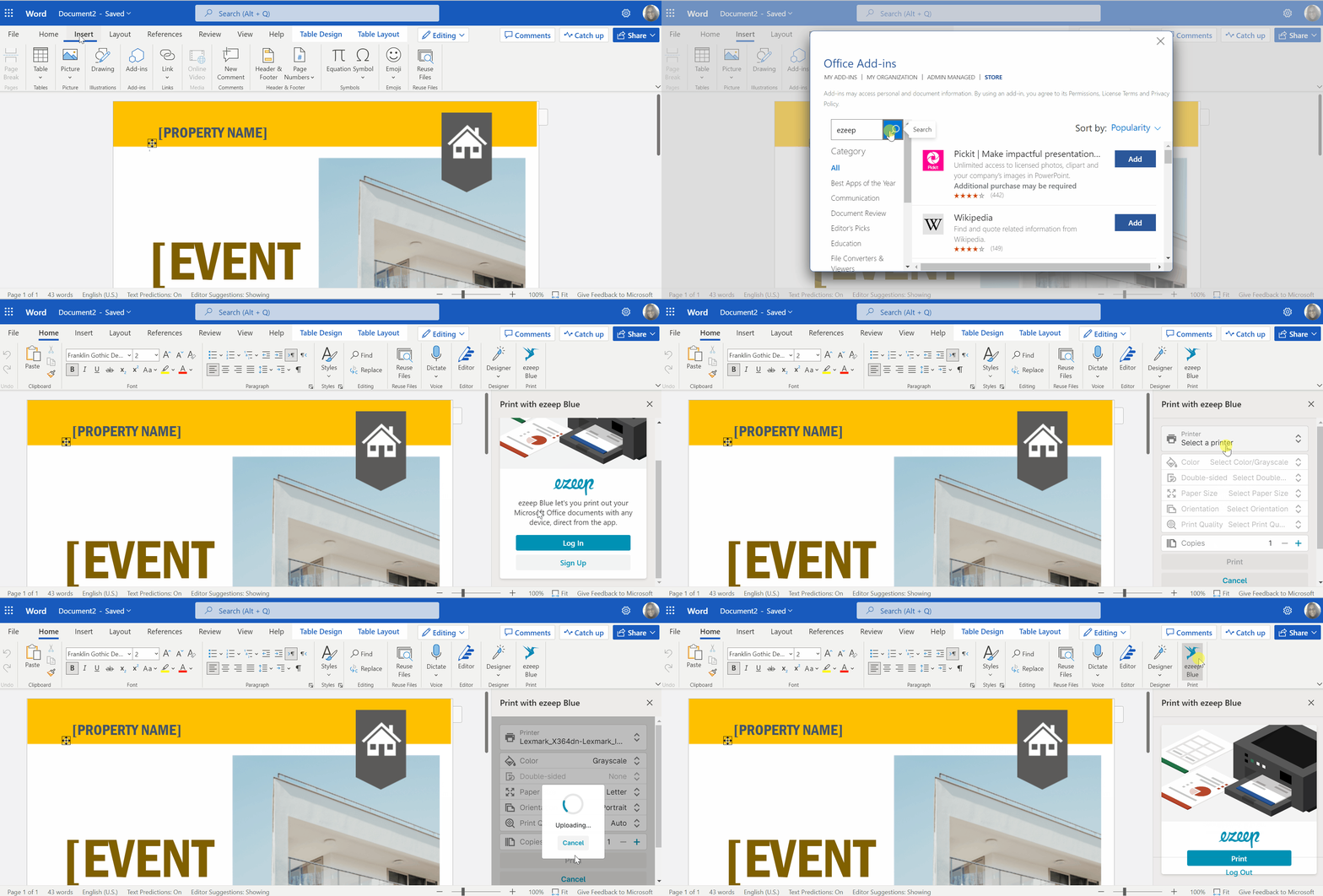
- Open your Microsoft 365 document and select the "Insert" on the top header
- Click the three dots at the end of sub header
- Select "add-Ins"
- Click "Office Store"
- Search for "ezeep" and click "add"
- Accept the terms and conditions by clicking on "Continue"
- The ezeep "add-in" is installed and ready to use!
- On the right pane, it will prompt you to Login or signup to ezeep
- Sign-in with your ezeep credentials
- When you are ready to print, simply click the "ezeep print" bird on the top header.
- Log in to ezeep with your ezeep credentials or if you don't dont have a subscription then sign up.
- Choose the printer that has been assigned to you from the list and print.
- Your document has been sent to the printer.