
After claiming an ezeep Hub, administrators can access its management interface remotely when the feature is enabled. The Hub must be connected to the local network and have internet access.
Note: This feature is available during 14-day trial or in the Pro, Coworking, Business and Enterprise Plans.
The ezeep Hub must be already connected to the local network at the remote location and have access to the internet. If you have not connected the hub to the local network go back to: Setting up the ezeep Hub
- Log in to the ezeep Admin Portal
- Select "Connectors"
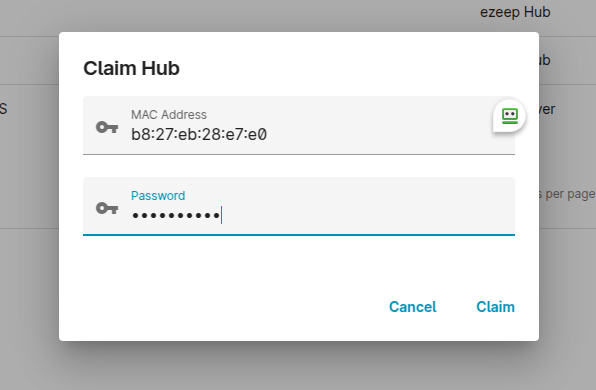
- Select "+Claim Hub"
- Enter the hubs MAC address and default password (default password is print4life) and click "Claim"
Note: The MAC address is printed on the bottom label attached to the ezeep Hub.
- Click the pop-out button next to the hub you have just entered
- A remote hub browser window will open
- Enter your hub admin credentials (default password is print4life)
- You are now logged on to the ezeep Hub remotely! You can now add your printers via the Printers page and you will then see them in your ezeep admin portal
Note: Please ensure the following endpoints are whitelisted and the following ports are open for Hub remote access
*.ezeep.com 443
*.azure-devices.net 8883