
Get Started now!
ezeep Blue is completely free for up to ten users. Sign up and get started with just a few clicks.

Microsoft is fundamentally modernizing the Windows print stack. With Windows Protected Print Mode (WPP) and the end of driver servicing via Windows Update, IT departments are facing concrete questions: What is changing? What needs to be done? And how can existing printers remain usable?
This post gives you a clear overview – no scaremongering, but with the right answers.
Windows Protected Print Mode is an optional security configuration introduced with Windows 11 24H2 and Windows Server 2025. It is part of Microsoft’s long-term strategy to reduce the attack surface of the Windows print subsystem.
When WPP is enabled:
Important: WPP is not enabled by default in the standard Windows installation. The configuration must be explicitly activated by administrators.
Independently of WPP, Microsoft has already stopped providing new V3/V4 printer drivers via Windows Update.
This does not mean that existing printers will immediately stop working. But it has medium-term implications for:
Together, these two developments send a clear signal: maintaining a dependency on locally installed legacy drivers is becoming increasingly difficult.
Many organizations operate printer fleets based on legacy drivers. These printers:
Replacing them solely because Microsoft is modernizing its driver model is not a viable strategy.
Therefore, the key question is:
How can organizations continue to reliably operate legacy printers in a modern Windows environment?
ezeep is designed to support both modern and legacy print environments. While Microsoft reduces driver dependency at the endpoint level, ezeep maintains a centralized driver pool in the cloud.
In concrete terms, this means:
In short: driver support does not disappear – it shifts. Instead of every Windows device maintaining its own driver stack, driver management is consolidated and centrally controlled.
For environments that have enabled WPP or use particularly restrictive endpoint policies, ezeep additionally offers driver-independent print workflows.
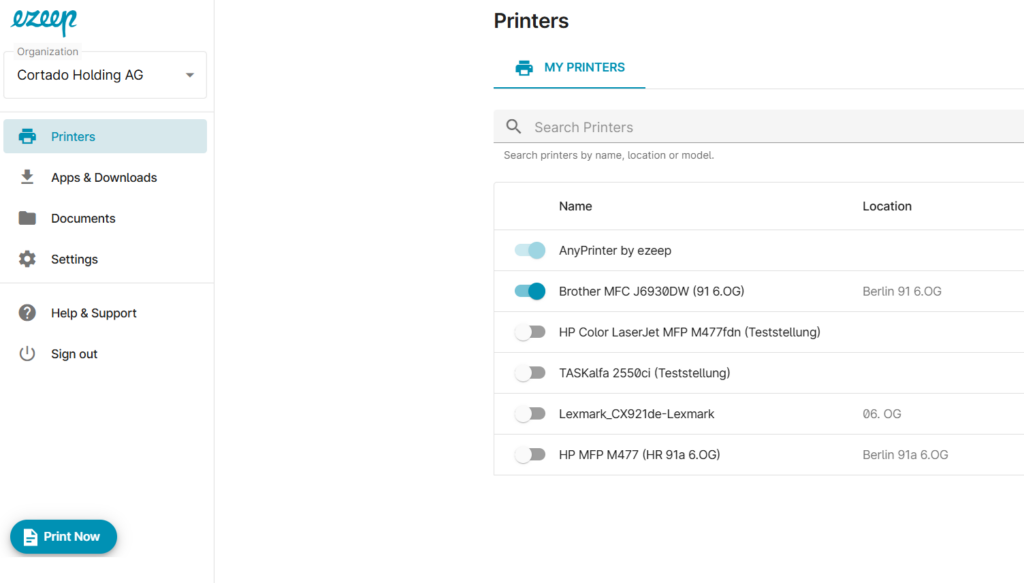
PrintNow via the ezeep Portal
This keeps print operations running even when strict driver restrictions apply at the endpoint level.
If you are planning a rollout of Windows 11 24H2 or evaluating WPP, we recommend the following assessment:
The shift in Windows printing should not cause panic – but it does require planning.
Microsoft is consistently modernizing its print architecture: legacy drivers are increasingly restricted at the endpoint, driver delivery via Windows Update is being phased out, and security modes like WPP could become the standard in the future. Organizations still relying on locally installed legacy drivers today should consider how to operate their printer fleets stably in the long term – without running into issues with every Windows update or device change.
ezeep ensures that:
✅ Legacy printers remain usable
✅ Drivers are managed centrally and uniformly – without local overhead
✅ No premature hardware replacement is necessary
✅ Print operations remain stable throughout the Windows modernization process
Driver management is changing – if you would like to know how these developments specifically affect your environment, we are happy to analyze your setup and show you practical next steps.
👉 Get in touch now and discuss your setup
Windows Protected Print Mode (WPP) is a security configuration in Windows 11 24H2 and Windows Server 2025 that blocks legacy printer drivers on endpoints and only allows printing via the modern IPP stack. WPP must be actively enabled by administrators and is not switched on by default.
No. WPP is not enabled in the standard Windows installation. Administrators must explicitly activate the mode. Organizations rolling out Windows 11 24H2 are therefore not automatically affected – but should actively monitor the development.
Microsoft is no longer providing new V3/V4 printer drivers via Windows Update. Already installed drivers continue to work, but for new installations, device replacements, or OS reinstalls, these drivers are no longer automatically available. This primarily affects long-term maintenance and hardware refresh cycles.
No – at least not immediately and not necessarily. Printers based on legacy drivers continue to work as long as WPP is not enabled. Solutions like ezeep also make it possible to continue operating legacy printers in modernized Windows environments by handling driver management centrally in the cloud.
When WPP is enabled, printers that rely on locally installed legacy drivers can no longer be used via the standard Windows print path. With ezeep, however, these printers remain usable – either via the centralized cloud driver pool or via driver-independent workflows like PrintNow.
IPP stands for Internet Printing Protocol – a modern, standardized protocol for print communication. Unlike legacy drivers, IPP does not require device-specific driver software on the endpoint. Microsoft is embracing IPP because it is more secure, lower maintenance, and cross-platform compatible.
ezeep manages printer drivers centrally in the cloud, so endpoints do not need to install their own drivers. For environments with WPP enabled, ezeep additionally offers PrintNow – a browser-based print workflow that works entirely without local driver installation or a Windows printer object.
ezeep is especially relevant for organizations that:
Our team is happy to help you assess your current print infrastructure and define concrete next steps.