Why A4 and Letter Paper Size Differences Matter for Printing

By Linda Martin on July 8, 2020
Why A4 and Letter Paper Size Differences Matter for Printing

Incorrect paper size is a common cause of print job failure, leading to frustration and wasted resources. Even a slight variation between A4 and Letter paper can disrupt operations, especially for businesses managing multiple printers or locations.

What is the difference between A4 and Letter paper size?
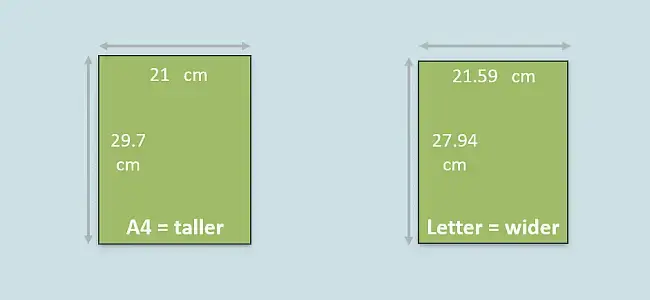
A4 paper size vs Letter
The difference is minimal, but important: A4 is a little taller, while Letter is a little wider.

Paper sizes vary significantly by region. North America primarily uses Letter paper, while most of the world uses A4. These seemingly similar sizes have different dimensions, which impacts how documents print.

The ISO 216 series of paper sizes, which includes A4, has a mathematical property that simplifies scaling. If you combine two pages of one size, they form a new sheet with the same aspect ratio. This makes it easy to scale documents up or down without distorting images or text.

In contrast, U.S. paper sizes like Letter were not designed with this unifying principle. This can make it more challenging to scale documents flexibly, creating potential issues when printing.

Pro tip: If you’re scaling an A-size page up, enlarge it by 141% for a perfect fit.

Why does A4 vs Letter paper cause printing problems for businesses?

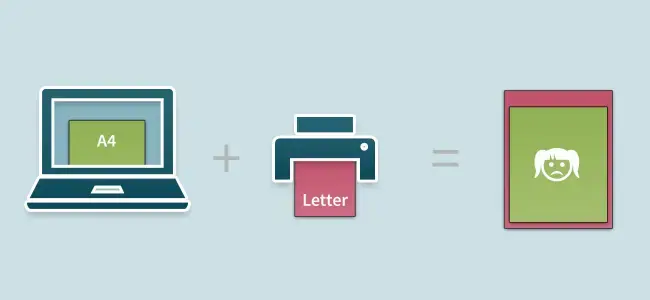
Many businesses encounter problems when printers are set to one paper size (e.g., Letter) but loaded with another (e.g., A4). This mismatch causes printing errors, wasted paper, and increased IT support tickets.

For example, at a coworking space in Berlin, users sent A4 documents to a printer configured for Letter paper. The printer, expecting Letter, would incorrectly shrink the A4 documents, resulting in prints with large, uneven borders because the physical A4 paper was larger than the expected Letter size. Some printers will simply refuse to print documents that do not match the expected paper format, adding to user frustration.

Letter vs A4 paper size
Printing an A4 document to printers set to Letter doesn’t usually end well.

Managing paper size settings across different printers and drivers can be complex. Settings may need adjustment on both the driver and the printer itself, and driver updates can sometimes overwrite these configurations, creating ongoing management issues for IT administrators.

ezeep understands the challenges that come with print compatibility and conflicting settings. Our goal is to simplify printing and print management, ensuring that documents print correctly regardless of paper size variations or regional standards. This helps reduce complications and keeps your printing operations running smoothly. ezeep is built on ThinPrint technology, trusted by Fortune 500 organizations handling a combined total of millions of printed pages daily.


Use ezeep free of charge for private purposes


ezeep-reporting
Get Started with ezeep
Start your 14-day free trial today
Start Free Trial


Frequently Asked Questions

What is the difference between A4 and Letter paper size?

A4 paper measures 210 × 297 mm (8.27 × 11.69 in), while Letter paper measures 216 × 279 mm (8.5 × 11 in). A4 is slightly narrower and taller than Letter. A4 is the international ISO 216 standard used in most of the world, while Letter is the standard size used in the United States, Canada, and a handful of other countries. The two sizes are similar enough to be visually mistaken for each other, but different enough to cause printing errors when used interchangeably.

Why does A4 vs Letter paper cause printing problems?

A4 vs Letter mismatches cause printing problems because printers cannot automatically know which paper size is loaded in the tray versus which size the document expects. When a document formatted for A4 is sent to a printer set to Letter (or vice versa), the printer either rejects the job, shrinks the content with awkward margins, or cuts off portions of the page. This is especially common in international offices, coworking spaces with global members, and companies using US-manufactured printers in Europe.

How do I fix a printer that prints the wrong paper size?

To fix a printer that prints the wrong paper size, check three places: the document's page setup in the application, the printer driver's default settings on the computer, and the paper size configured on the printer itself. All three must match the paper physically loaded in the tray. On Windows, update the default size under Printers & scanners → your printer → Printer preferences → Paper/Quality. On macOS, change the default under System Settings → Printers & Scanners. Driver updates sometimes reset these settings, so verify after any update.

Why do US printers default to Letter instead of A4?

US-manufactured printers default to Letter because Letter (8.5 × 11 in) is the North American standard, codified by US government paper procurement rules in 1980. Manufacturers ship with regional defaults that match the destination market, but when US printers are deployed in Europe or other A4 regions, the default often stays Letter unless reconfigured. This regional mismatch is one of the most common sources of printing errors in international business environments.

How does cloud printing solve A4 vs Letter problems?

Cloud printing solves A4 vs Letter problems by standardizing the print pipeline and handling paper size translation automatically on the server side, not the local driver. Platforms like ezeep render documents in the cloud and match them to the correct paper size configured on each target printer, so a user in Denver can send a Letter-sized document to a Berlin office printer loaded with A4 without manual reformatting. This eliminates the most common paper-size support tickets for IT teams managing printers across multiple regions.

Back to top