By Ines Reinhardt on April 29, 2026
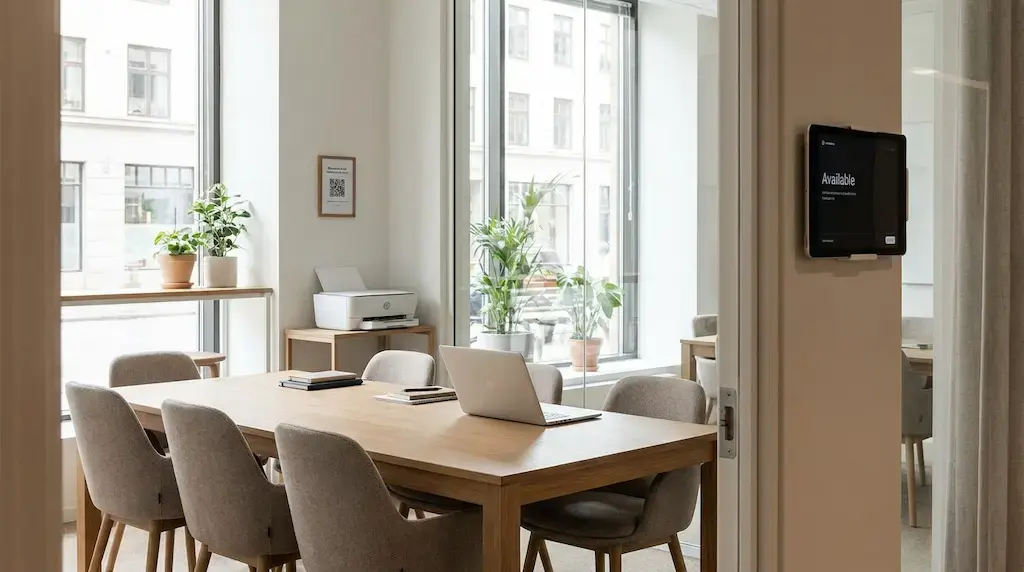
Meeting rooms are some of the most valuable areas in any coworking space. They create revenue, support professional client meetings, and make the space more attractive for teams, freelancers, and companies.
At the same time, they can put your community routines to the test.
One person books three hours just in case and only uses 40 minutes. The next group runs over. Someone leaves coffee cups behind. Another member blocks the room for calls that would have worked just as well in a phone booth.
Good meeting room rules prevent exactly these situations without sounding strict or fussy. They create clarity, protect shared resources, and help everyone feel welcome.
Why Meeting Room Rules Matter in Coworking Spaces
Meeting rooms work best when everyone knows what is expected. For operators, that means fewer questions, fewer complaints, and less manual follow-up. For members, it means predictable availability, fair use, and a room that is ready when they need it.
The goal isn't to maximize rules, but to maximize flow. The real task is to make the right rules feel natural, and to show them at the exact moment they matter.
In practice, that means:
- The booking confirmation includes the most important behavior guidelines, not the full rulebook.
- A reminder shortly before the end of the booking is sent automatically by the booking system.
- A QR code in the room leads directly to the extension option, not to instructions explaining how to extend.
Which Meeting Room Rules Actually Help?
The best rules do not try to cover every possible scenario. They cover the moments that create real friction in daily coworking life: booking, punctuality, cancellation, cleanliness, and equipment.
A practical rule set could look like this:
- Book only the time you actually need. That keeps the room available for others.
- Start and finish on time. Leave a few minutes for setup and wrap-up.
- Cancel early when you no longer need the room. Other members will appreciate the free slot.
- Take everything you brought in, cups, cables, and catering, so the room is ready for the next person.
- Report technical issues right away so the space team can help faster.
- Use meeting rooms for meetings. For short one-on-one calls, phone booths or quiet work areas are often the better fit.
Tone matters. Instead of “No room blocking,” say “Release time slots you no longer need.” Instead of “Do not leave the room messy,” say “Leave the room ready for the next person.”
How Operators Can Reduce Community Stress
Rules work better when they are visible before something goes wrong. They should be easy to understand, easy to follow, and built into the everyday flow.
That starts with the booking process. When members reserve a meeting room, they should clearly see how long they can book it, which cancellation window applies, and what is expected after use. A short note in the room can help too, for example on a small table display or on the room screen.
It works even better when rules do not feel like a house policy, but like a shared community standard:
“Help every booking start smoothly: please leave the room on time and ready for the next group.”
That is clear, friendly, and hard to misunderstand.
Digital Booking Systems for Coworking Meeting Rooms
People rarely cause conflict on purpose; usually, they’re just making honest mistakes. Often, a lack of visibility is the issue. Is the room really free? Has the booking been extended? Can I walk in spontaneously? Who booked the room right now?
A digital booking system removes that uncertainty. Members can see room availability, book on their own, and receive clear information or a short checklist with their reservation. Booking displays outside the room, such as a tablet or screen showing the current calendar, make the status clear at a glance. Operators save time because fewer manual checks and conversations are needed.
Preparing for a professional meeting takes more than an available room. Guests may need documents, name tags, or a printed agenda at short notice. That is often the moment when a space can either feel polished or one that creates extra work for the team.
With ezeep, printing fits naturally into the coworking day. Members and guests can print on their own without the team having to explain printer access, drivers, or support steps each time. The space keeps control over usage and costs, while the team can focus on the community instead of printer problems.
That keeps the meeting room experience professional, without turning the space team into last-minute IT support.
A Checklist for Meeting Room Rules That Enforce Themselves
- A booking system with automatic reminders, for example 5 minutes before the booking ends
- One-click extension directly from the reminder when the room is available
- Room status displays that show current and upcoming bookings
- Onboarding that demonstrates the process instead of only listing rules
Conclusion: Good Rules Do Not Feel Like Rules
Meeting room rules in coworking spaces do not need to sound strict to work well. The clearer, friendlier, and more practical they are, the easier they are for the community to accept.
For operators, the best approach is simple: a few rules, shown in the right places, built directly into the booking process, and written in a tone that fits the community. That leads to fewer misunderstandings, fewer conflicts, and better meeting experiences for everyone.
And when booking, room use, and services such as printing with ezeep run smoothly, there is more time for what makes a coworking space work: productive days, relaxed interactions, and a community that enjoys coming back.
24/7 Coworking with Printing Included
Rooftop Office Uses ezeep, Lexmark, and Nexudus for Printing