By Karen Thulmann on July 10, 2026

Every AI tool you use right now can write code, query databases, send Slack messages, and file Jira tickets. Not one of them can print a document.
That gap exists because printing never got the API-first treatment that other enterprise workflows did. It stayed locked behind driver stacks, print servers, and vendor portals that AI agents can't reach. Until today.
The ezeep MCP server is now live, and for the first time, you can print directly from AI, without a manual REST integration or a driver workaround.
What Is the ezeep MCP Server?
The ezeep MCP server is a hosted implementation of the Model Context Protocol that exposes cloud printing as a set of callable tools for AI agents, assistants, and app builders. Any MCP-compatible client, including Claude Desktop, Cursor, GitHub Copilot, and Lovable, can connect to ezeep and discover 20 tools across printing, fleet administration, and developer support.
Connect the endpoint. Authenticate once with OAuth. Call list_printers. That's it.
From zero to first print in under 10 minutes, on any ezeep plan, at no additional cost.
Why Couldn't AI Agents Print Documents Before ezeep MCP?
Ask Claude or Lovable to add printing to an app and the suggestions fall apart quickly. Google Cloud Print shut down in 2021. Browser APIs can't reach real printers. Custom REST integrations work, but they take hours to build and days to debug across printer hardware.
The result is predictable: developers cut the feature, or it never gets added in the first place.
ezeep MCP solves this at the root. Instead of asking developers to integrate against our REST API manually, the AI discovers the tool surface, reads our integration guide (no auth required), generates working code, and runs a test print in a single conversation. What used to take a sprint now takes one prompt.
What Can the ezeep MCP Server Do?
Connect an AI assistant to the ezeep MCP server and it gets access to 20 tools, split into three groups: printing, admin, and developer support.
Printing tools handle the basics: checking which printers exist, pulling details on a specific one, sending a print job from a URL or an uploaded file, and checking how that job is doing. There's also a tool for checking which file types are supported, so the AI doesn't have to guess.
Admin tools cover fleet management: checking connector status, flagging printers with problems, managing groups, and inviting or assigning users.
Then there's developer support, and this is the interesting one. These tools (an integration guide, an API reference, and code examples) don't require authentication.
That detail matters more than it looks. Because the developer support tools are open, an AI client can read ezeep's integration docs and start generating scaffolding code before a user has even signed in. ezeep becomes discoverable by AI assistants the moment they know to look.

How Are Developers and IT Teams Using the ezeep MCP Server?
People are using ezeep MCP in two different ways, and most customers end up doing both.
-
Build-time. A developer (or someone "vibe coding" with help from an AI) is working in a tool like Lovable, Cursor, or Claude Desktop and wants to add printing to their app. Instead of digging through API docs, they let the AI talk to ezeep MCP directly. It explores what's available, reads the integration guide, writes the code, and tests an actual print job. Once everything's working, the app doesn't need MCP anymore. It calls the ezeep API on its own from then on. MCP's job was just to get them there fast.
- Runtime. Here, MCP isn't just a setup tool. It's the permanent way an AI agent interacts with ezeep, every time, as part of something bigger. Think IT automation that checks for broken printers, a warehouse assistant that prints labels on demand, an onboarding workflow that sets up new hires with printer access, or a document pipeline that needs to print as one step among many. In these cases, printing isn't a separate feature the agent has to handle. It's just another tool the agent reaches for.
So you have the same server, same tools, and same login. What changes is how long MCP stays in the picture.
Who Should Use the ezeep MCP Server?
Developers and vibe coders building apps that need to print. Whether you're using Lovable to launch a shipping tool or Cursor to build an internal ops app, ezeep MCP gets you from "add printing" to a working test print in one conversation, without reading API docs.
IT admins who already live in Claude or Copilot. Fleet status, user provisioning, printer group management, all reachable through natural language. "Which connectors are offline?" is faster than opening a dashboard.
Integration partners building vertical software in warehouse management, healthcare, logistics, or point-of-sale. ezeep's support for 6,000+ printer drivers and native Zebra label printing (ZPL, EPL, ZPLII) means the AI can route print jobs to any hardware you're running.
How Does the ezeep MCP Server Handle Security and Credentials?
Credentials are never visible to the AI model. OAuth tokens are exchanged directly between the MCP client and the ezeep server over HTTPS. They don't appear in the LLM conversation context, in the client's prompt history, or at the model provider. The AI sees the tool call and its result. That's it.
Document data moves through the same ezeep infrastructure that handles every other print job on the platform. The model never sees the rendered output.
How Do You Get Started With the ezeep MCP Server?
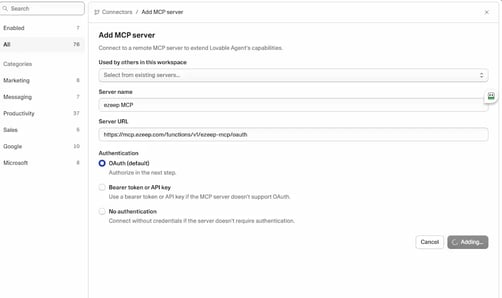
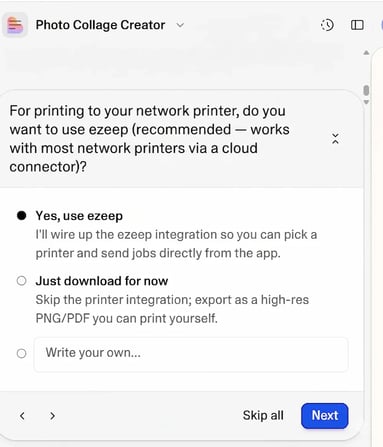
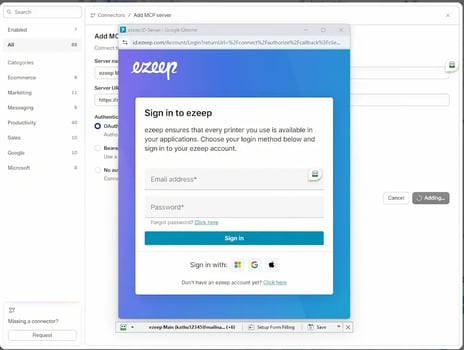
The ezeep MCP server is available on all ezeep plans at no additional cost. Usage counts toward your standard ezeep API quotas.
To get started:
- Add the ezeep MCP endpoint to your AI client config
- Complete the OAuth flow with your ezeep organization admin account
- Call
list_printersto confirm the connection - Call
print_from_urlwith a test PDF
If you don't have an ezeep account yet, you can start a free 14-day trial and have printing in your AI workflow before the end of the day.

How to Connect ezeep MCP to Claude Code

New, Enhanced Printing Plans with ezeep