By Karen Thulmann on August 26, 2026
Last updated on September 22, 2026
Windows has three printer driver models in circulation. V3 is the legacy model, dating to Windows 2000: a device-specific driver package that installs on both the print server and the client, and can carry additional components that load inside the spooler process. V4 arrived with Windows 8 and Windows Server 2012: still a manufacturer driver, but isolated from the spooler, architecture-independent, and no longer copied from server to client. The IPP class driver is Microsoft's built-in, driverless option: the printer advertises its own capabilities over the Internet Printing Protocol and Windows builds the queue with no manufacturer code involved.
The thing most IT teams get wrong is assuming V4 is the safe modern option. Microsoft is deprecating V3 and V4 together. This post explains what each model does, why V4 did not solve the problem it was built to solve, and what the shift to IPP actually means for a fleet.
What is a V3 printer driver?
A V3 printer driver is the classic Windows print driver model, introduced with Windows 2000 and still the most common in enterprise environments. It is device-specific, it installs on both the print server and every client that prints to that printer, and it can include port monitors, print processors, and language monitors that load inside the spooler process.
Two properties make V3 the model Microsoft wants gone:
-
The deployment mechanism. Under Point and Print, a client connecting to a shared V3 printer downloads the driver package from the print server and installs it. That is a machine executing code it just fetched from another machine over the network, and it is exactly the path PrintNightmare exploited.
- Architecture coupling. A V3 driver is built for a specific processor architecture. A print server sharing printers to both 32-bit and 64-bit clients has to host both driver packages, which is why print server driver stores accumulate into the hundreds and why removing a driver breaks something six months later.
What is a V4 printer driver?
A V4 printer driver, introduced with Windows 8 and Windows Server 2012, is a manufacturer driver designed for sharing and isolation. It is architecture-independent, so one driver serves 32-bit and 64-bit clients. It is isolated from the spooler process, so a driver crash does not take the spooler down with it. Under enhanced Point and Print, the client does not copy the driver from the server; it uses a compatible inbox class driver or obtains the V4 package from Windows Update.
V4 solved real problems. The architecture matrix collapsed. Driver crashes stopped being spooler crashes. The server-to-client driver copy, the specific mechanism PrintNightmare abused, was no longer part of the shared-printer flow.
What V4 did not solve is the underlying premise. A V4 driver is still manufacturer-supplied code, running on the endpoint, in the print path. Configuration still happens through printer extension apps that the manufacturer writes. The code is better fenced than it was, and it is still their code on your machine.
That is why Microsoft's deprecation notice names both models in the same breath. As of January 15, 2026, new third-party V3 and V4 printer drivers are no longer published to Windows Update for Windows 11 and Windows Server 2025 and later, except by case-by-case approval. V4 is not the destination. It is a waypoint that lasted about twelve years.
What is the IPP class driver?
The IPP class driver is Microsoft's built-in printer driver. It carries no manufacturer code. When a printer is added, Windows queries the device over the Internet Printing Protocol, the printer reports what it can do (paper sizes, duplex, color modes, finishing options), and Windows constructs the print queue from that reply using the inbox driver.
The printer describes itself, so nothing needs to be installed to describe it. That is the whole idea, and it is what "driverless" actually means in this context.
The requirement is that the printer speaks IPP properly. In practice that means Mopria certification, which is the Mopria Alliance's program for verifying that a device implements the standard correctly. The Alliance has certified more than 9,000 printer models across 24 brands. Devices that predate certification depend on the manufacturer shipping firmware and resubmitting the model for testing, which for out-of-support hardware is not going to happen.
Why is Microsoft moving to IPP?
Because the third-party driver is the vulnerability. Microsoft attributes 9% of all Windows security issues reported to the Microsoft Security Response Center to the print stack, and around 53 Print Spooler vulnerabilities have been disclosed since PrintNightmare in 2021.
The published timeline is specific:
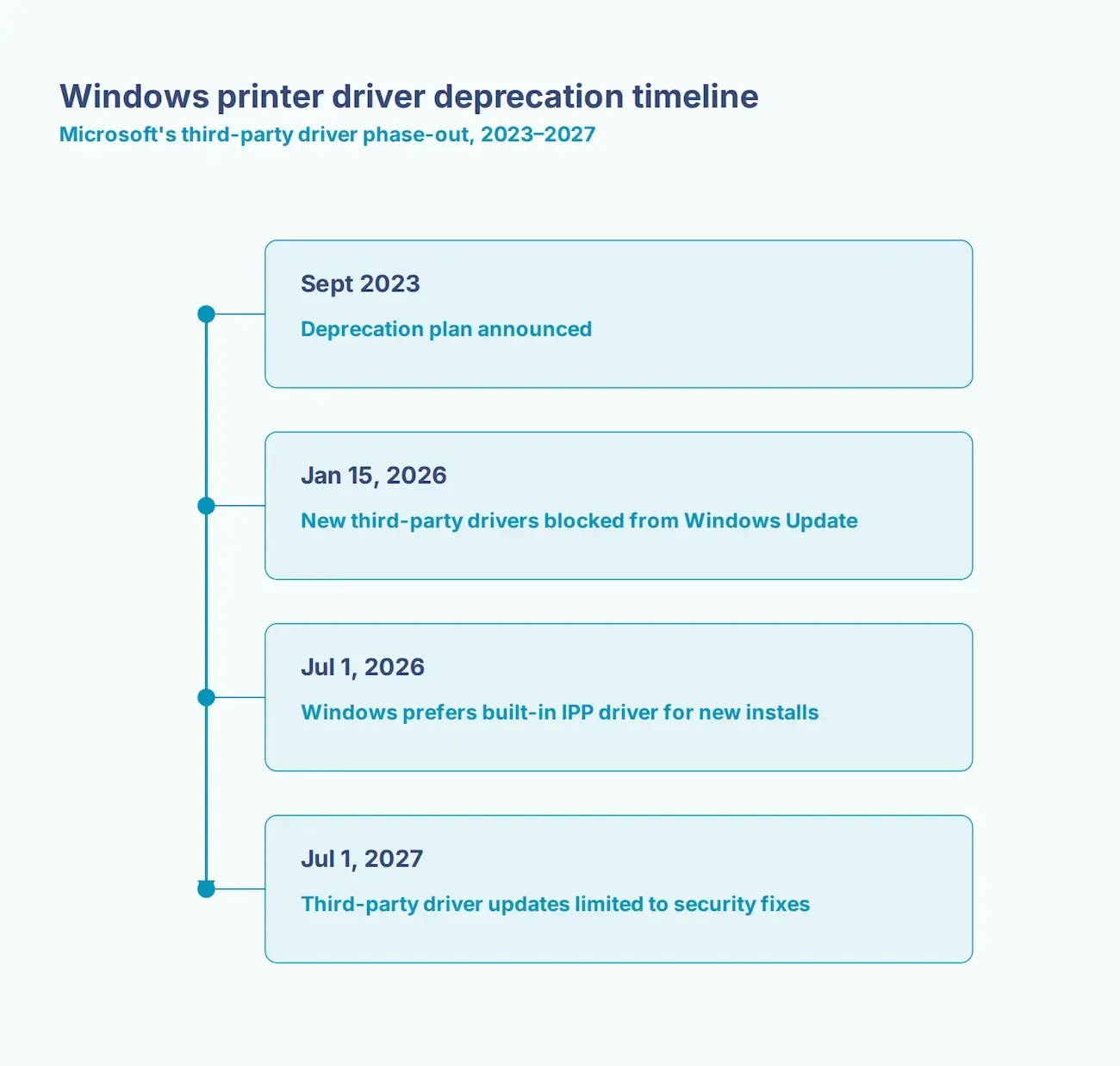
Existing drivers keep working. Manufacturers can still ship installers from their own sites. What ends is Windows Update as the maintenance channel, and with it the assumption that drivers look after themselves.
Layered on top is Windows Protected Print mode, introduced with Windows 11 24H2 and Windows Server 2025. When WPP is enforced, third-party drivers are blocked outright and only Mopria-certified printers function. Microsoft has said it intends WPP to become the default but has not announced a date.
What does this mean for a mixed printer infrastructure?
Most fleets are not all one thing. A typical mid-market environment has a few recent Mopria-certified MFPs, a larger tail of older network printers on V3 drivers, and a set of specialty devices (label printers, plotters, receipt printers) that no standard covers well.
The IPP path serves the first group cleanly. It serves the second group only if the manufacturer issues firmware. It frequently does not serve the third group at all, which is why the earliest complaints about WPP testing came from teams with Zebra and Dymo hardware.
Cloud rendering takes a different route through the same problem. Rather than requiring the printer to negotiate IPP with Windows, ezeep renders the job in the cloud against a library of over 6,000 manufacturer drivers and delivers print-ready data to the device through the ezeep Hub. The driver still exists. It just runs in the cloud rather than on your endpoint, which means it is not on the machine WPP is protecting and not on a print server anyone has to patch.
For a fleet where the Mopria check comes back with a long red column, that is the difference between a hardware refresh budget and a Tuesday afternoon.

Do Software PDF Printers Work Under Windows Protected Print?
Windows Protected Print vs. Windows Ready Print: What Changed