By Henning Volkmer on June 12, 2026

TL;DR
Windows Ready Print and Windows Protected Print Mode (WPP) are related but not the same. Windows Ready Print is Microsoft's name for the modern, IPP-based print platform, the default from July 2026, with legacy drivers still available as a fallback. WPP is the strict enforcement mode built on top of it: no fallback, no legacy drivers, Mopria-certified printers only. The rename doesn't change the timeline or your action items. The migration window is now.
Windows Ready Print and Windows Protected Print Mode (WPP) are not the same thing, though they're closely related and the distinction matters for how you plan your environment.
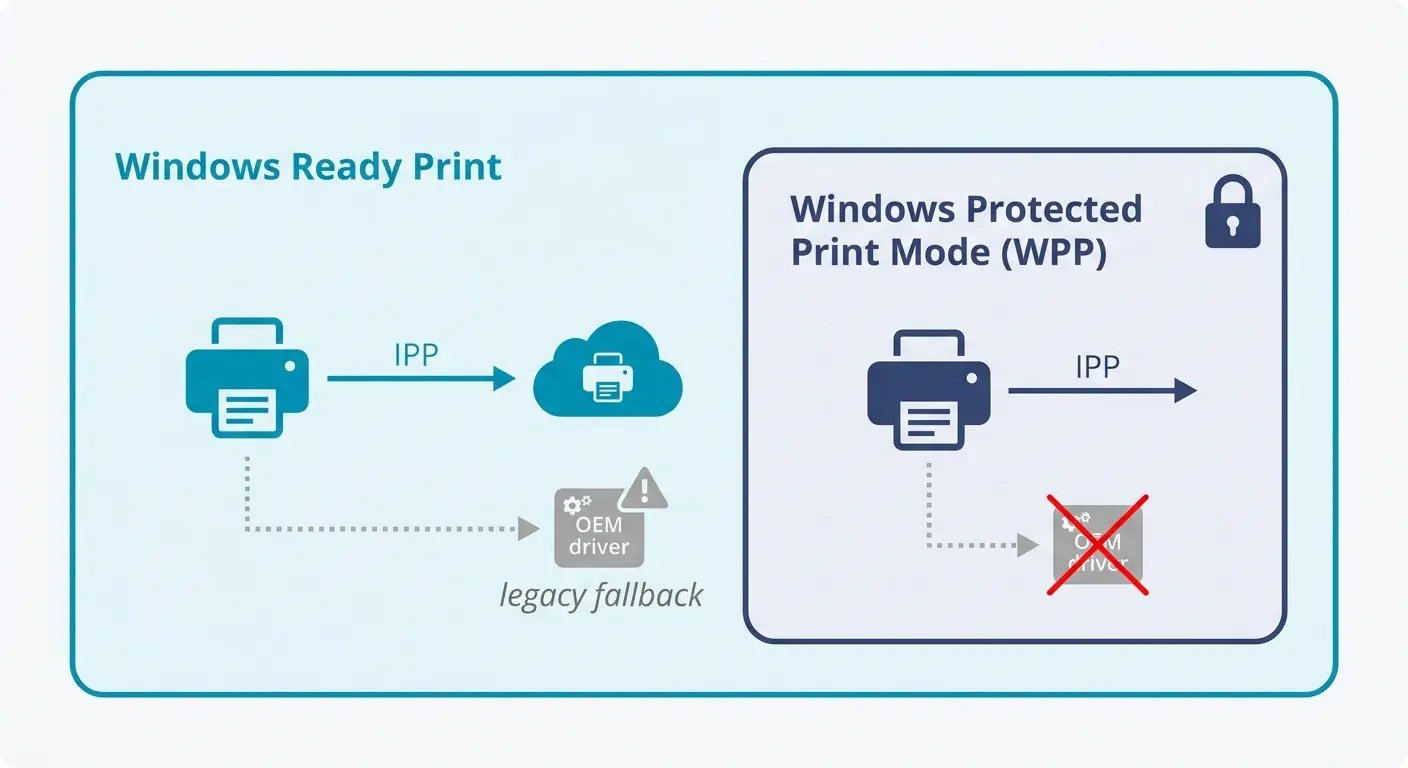
Windows Ready Print is Microsoft's name for the modern print platform: IPP-based, driverless by default, with legacy drivers still available as a fallback. WPP is the strict enforcement mode built on top of it. When WPP is enabled, the fallback disappears — legacy drivers are blocked entirely, and only Mopria-certified printers work.
Microsoft introduced the Windows Ready Print name in May 2026, surfacing it in the Windows Settings UI. If you've been tracking the driver deprecation timeline, here's what actually changed and what didn't.
What is Windows Protected Print Mode (WPP)?
Windows Protected Print Mode is a security feature Microsoft introduced with Windows 11 24H2 and Windows Server 2025. When enabled, it removes third-party print drivers from the system entirely and blocks new driver installations. Only printers that communicate via the IPP class driver (the Microsoft inbox driver) can be used. That means Mopria-certified devices only.
The security motivation was PrintNightmare and a decade of similar vulnerabilities. Print drivers run with elevated system privileges. Third-party drivers, some of them decades old, have been one of the more persistent attack surfaces in Windows. 9% of all Windows security vulnerabilities trace back to the print stack, according to the Microsoft Security Response Center. WPP closes that door.
WPP is currently off by default. Microsoft has stated that WPP becoming the default is their intention by 2027, though no firm date has been officially announced.
What is Windows Ready Print?
Windows Ready Print is Microsoft's new consumer-facing name for the same print platform. The name appeared in Windows Insider builds in May 2026 and surfaces in Settings under Bluetooth & Devices > Printers & Scanners as a toggle: "Default install printers using Windows Ready Print."
When that toggle is on, new printer installations default to the IPP inbox driver when supported. When it's off, Windows may fall back to manufacturer-specific drivers or older installation methods.
Windows Protected Print Mode is a stricter enforcement of this: with WPP fully enabled, unsupported printers are removed and no fallback is available. Windows Ready Print (the default-IPP toggle) is a softer version - the system prefers modern IPP, but OEM drivers remain as a fallback for incompatible devices.
So there are now two related but distinct settings:
- Windows Ready Print toggle - prefers IPP, keeps OEM fallback available
- Windows Protected Print Mode - IPP only, no exceptions, legacy printers removed
Both operate on the same print stack. The WPP acronym still appears in Group Policy, the Windows Registry, and Microsoft's developer documentation.
Why the rename matters for IT teams
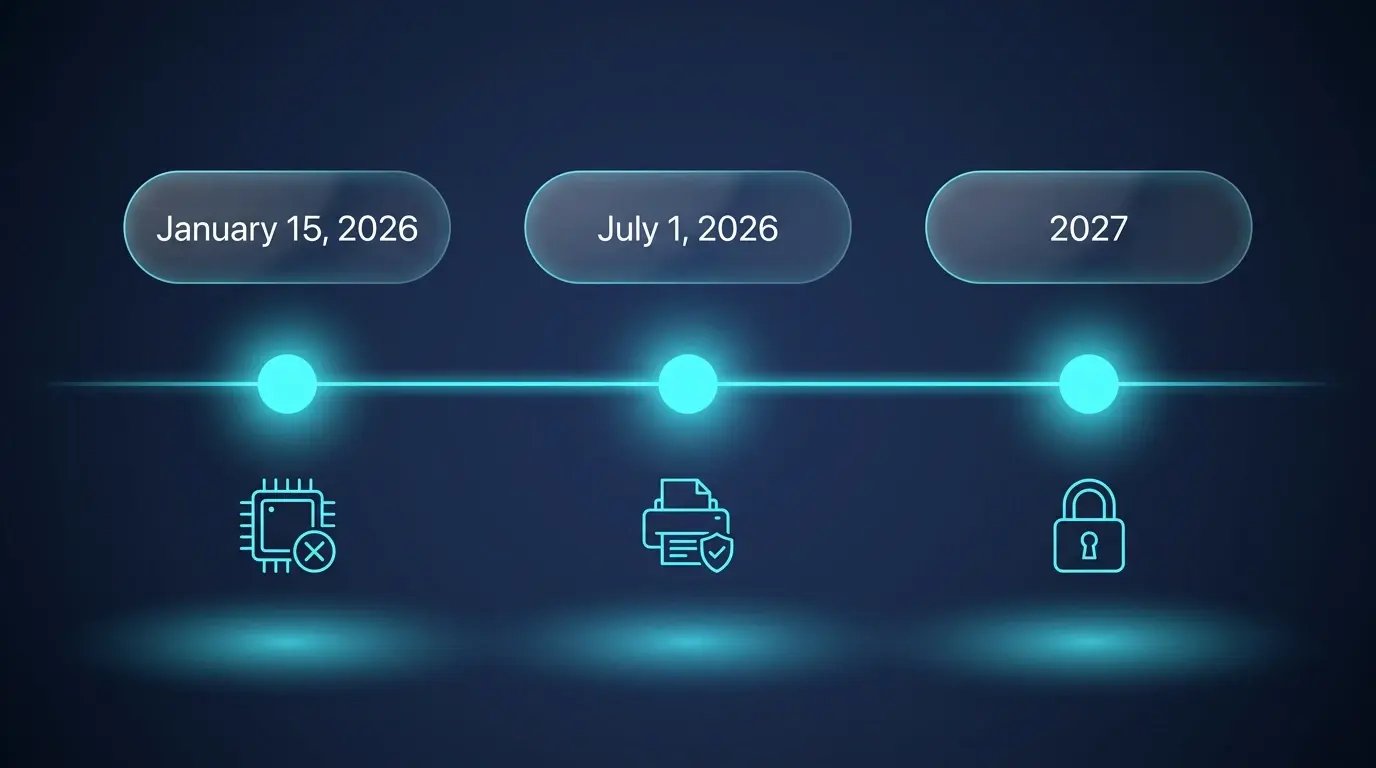
The practical impact on your environment is minimal. The feature didn't change. The timeline didn't change. July 1, 2026, still brings the shift to IPP as the default driver for new printer installations. July 2027 still brings WPP-on-by-default.
What the rename does signal is Microsoft's direction of travel. Windows Ready Print isn't framed as a security lockdown - it's framed as readiness. The modern print platform is becoming the default experience for all Windows users, not just security-hardened environments. That's a meaningful shift in how Microsoft is positioning this: less "you must comply," more "this is just how Windows printing works now.”
What does this mean for your print fleet today?
The renaming doesn't extend or delay anything. The action items from the WPP rollout still apply:
Before July 1, 2026, Windows already stopped publishing new third-party printer drivers to Windows Update for Windows 11 and Windows Server 2025 (that deadline passed on January 15, 2026). Any printer that needed a newly published driver to function is already affected.
From July 1, 2026, new printer installations on Windows default to the IPP inbox driver. Printers that aren't Mopria-certified won't install cleanly under Windows Ready Print. They'll need the OEM driver path, which remains available unless WPP is fully enabled.
By 2027, Windows Protected Print Mode is Microsoft's stated intention for the default. Third-party driver updates stop (security patches excepted). At that point, any printer that isn't Mopria-certified and IPP-capable becomes a liability in your fleet.
The practical audit question hasn't changed: how many of your printers are Mopria-certified and reachable via IPP? That number determines how much work you have between now and July 2027.
How does ezeep work in a Windows Ready Print environment?
ezeep was built on driverless printing from the start. There are no local drivers to install, no print servers to maintain, and no driver conflicts to resolve. Print jobs are processed in the cloud and delivered to printers via IPP or the ezeep Hub device.
That means the Windows Ready Print transition, and the stricter WPP mode it's moving toward, doesn't create new work for ezeep customers. The architecture that made ezeep WPP-compatible was already in place before Microsoft introduced the feature name change.
For organizations mid-migration, ezeep can operate alongside existing driver-based infrastructure during a phased rollout. You don't have to replace your entire fleet to start using it. Mopria-certified printers pick up IPP natively; older devices can continue through alternative paths while you work through the transition.
ezeep also handles the multi-OS reality most IT teams deal with. The IPP default on Windows doesn't automatically simplify printing on macOS, ChromeOS, or mobile devices. ezeep provides consistent print behavior across all of them, from a single cloud-based management console.
Will Windows Ready Print Break Title and Escrow Printers?
Do Software PDF Printers Work Under Windows Protected Print?