By Karen Thulmann on August 17, 2026

Ask an IT director what the print server costs and you will usually get the hardware number. Maybe the Windows Server license. Almost never the thing that actually costs the money, which is the hours.
The hardware is the cheapest part of a print server. The expensive parts are distributed across a help desk queue, a patch cycle, a VPN configuration, and an on-call rotation, which is precisely why they never appear on a line item. This post breaks the real cost into its parts so you can put a number on your own environment.
How much does it cost to run a print server?
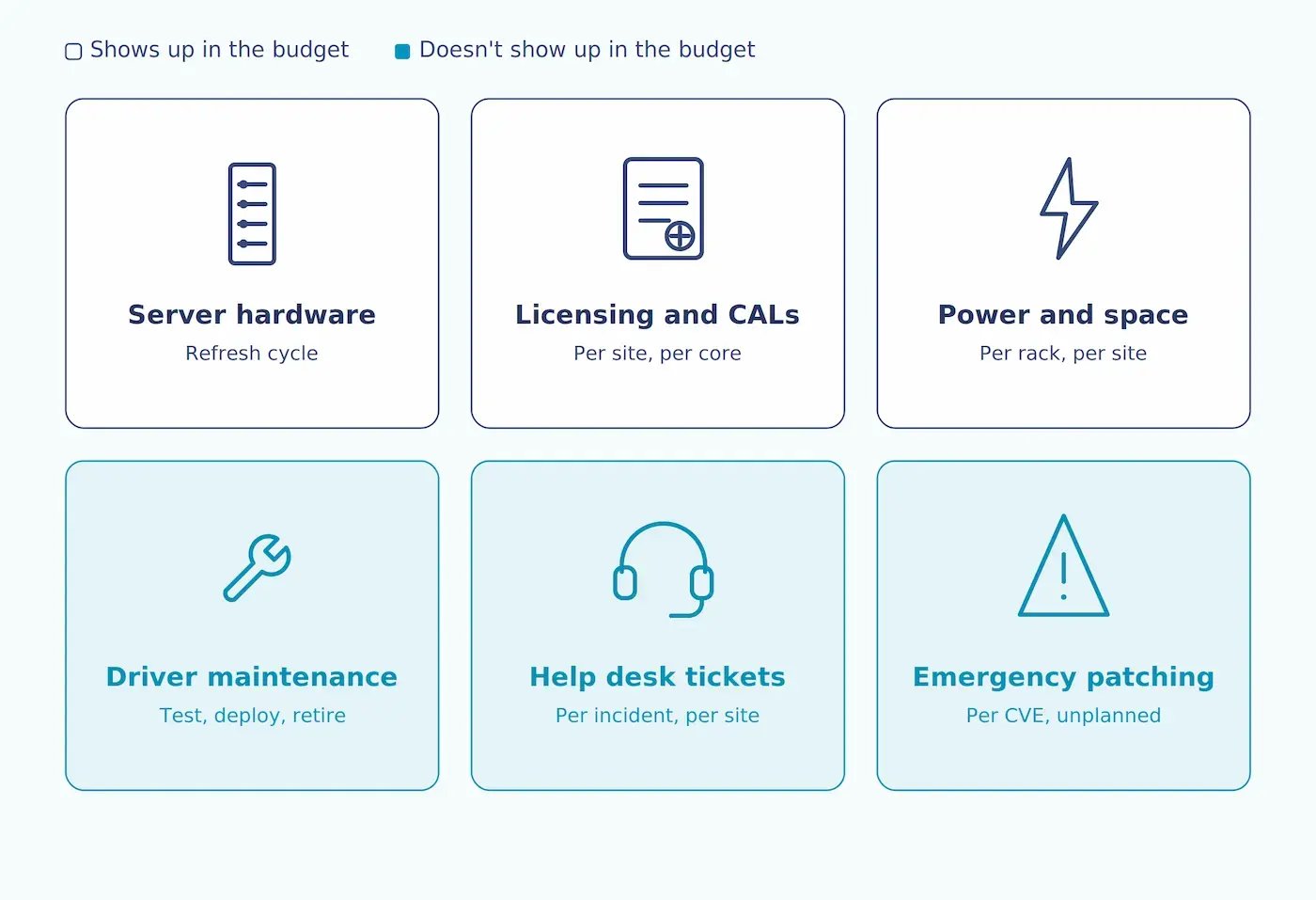
A print server carries costs in six categories:
-
Server hardware and its refresh cycle
-
Windows Server licensing and client access licenses
-
Power and rack space
-
IT hours spent on driver and spooler maintenance
-
Help desk time on print tickets
-
Emergency response when a print-stack vulnerability lands
Only the first three appear in a budget. The other three are where most of the money goes.
What are the server costs everyone counts?
Server hardware. A physical print server, or a VM's share of a host, on a three-to-five year refresh cycle. Multiply by the number of sites, because print servers do not centralize well across a WAN.
Windows Server licensing and CALs. Per-core licensing for the server, plus client access licenses. This one is easy to underestimate in multi-site organizations, where each location's server is licensed separately.
Power and space. Modest per server. Not modest across fifteen branch offices, each running a box whose entire job is to move documents to paper.
These are the numbers that make it into the TCO spreadsheet. They are also, in most environments, under half the real total.
What are the server costs nobody thinks about?
Driver maintenance. Every printer model needs a driver. Every driver needs testing against the current Windows build, deploying, and eventually removing. Print server driver stores accumulate: most have packages for printers that were decommissioned years ago, and nobody removes them because nobody is certain what will break.
Then the driver landscape shifts, but not evenly. As of January 15, 2026, Microsoft no longer publishes new third-party printer drivers to Windows Update for Windows 11 and Windows Server 2025 and later. From July 1, 2027, driver updates through that channel are limited to security fixes.
For Mopria-certified printers, this is good news. Windows increasingly defaults to its own IPP class driver, so there's no vendor driver to source, test, or patch in the first place. For everything else, legacy multifunction devices, finishing options, anything that doesn't fit the IPP model, the opposite is true. The channel that quietly delivered and updated those drivers is closing. IT teams now have to package and distribute them manually, on top of everything else already sitting on the driver store.
The maintenance burden isn't shrinking. It's concentrating on the hardware you were least equipped to handle it for.
Spooler failures. The print spooler hangs, the queue jams, someone restarts the service. This is such a routine part of Windows administration that most teams have stopped counting it as work. Count it. A five-minute fix, twice a month, across fifteen sites, performed by someone whose time is worth real money, is not five minutes.
Print tickets. "I can't see the printer." "It's printing to the wrong tray." "It worked yesterday." Driver conflicts, printer mapping failures at login, and per-device setup are among the most common categories in any help desk queue. They are individually trivial and collectively enormous, and they are the reason print has a reputation problem inside IT teams.
VPN dependency for hybrid workers. A print server needs network proximity, which for remote or hybrid workers usually means a VPN tunnel. For some organizations that tunnel is doing double duty (file shares, internal apps) and printing is just one more thing riding on it. For others, especially ones that have already moved file storage and internal tools to the cloud, the print server is the last reason the VPN exists at all. Eliminating it doesn't just remove a support case, it removes the tunnel entirely.
Emergency patch response. This is the one people forget until it happens. When PrintNightmare landed on July 1, 2021, IT teams spent the following week patching out-of-band, auditing Point and Print registry settings, and in many cases disabling the spooler on domain controllers outright. That week was not budgeted.
It was not a one-off either. Around 53 Print Spooler vulnerabilities have been disclosed since PrintNightmare, four of which are confirmed as exploited in the wild. Microsoft attributes 9% of all Windows security issues reported to the Microsoft Security Response Center to the print stack. Each of those is a potential unplanned week.
Why do multi-site organizations pay the most?

Print servers do not scale with the business. They scale with the number of buildings, which is a different and much worse curve.
Centralizing print servers across a WAN means every job crosses the link, which is slow and fragile. So each site gets its own server. Each server is another license, another patch target, another driver store, another thing to monitor, and another box that someone has to physically visit when it stops responding at a location with no on-site IT.
Windows has a partial answer to this: Branch Office Direct Printing lets a client pull the driver from a central server once, then print directly to the device, skipping the server for the job itself. It helps with the WAN bottleneck. It does nothing for the rest of the list. Each client still needs the driver installed and maintained. The print stack is still exposed to spooler vulnerabilities.Remote and hybrid workers still need a tunnel back to the office. Most multi-site organizations end up running local servers anyway, because BODP solves one problem out of six.
What does the cost structure look like without a server?
Removing the print server removes the hardware, the Windows Server license, the CALs, the driver store, the spooler, and the VPN dependency. What replaces it, in a cloud-rendered architecture, is a subscription and a small connector device per site.
With ezeep, the ezeep Hub connects local printers to the cloud over an outbound-only connection. Deployment takes minutes rather than a build day, and no one needs to be on site after the initial plug-in. Print jobs render in the cloud against a library of over 6,000 manufacturer drivers, so nothing is installed on endpoints. Adding a new office means shipping a Hub, not procuring and building a server.
The cost categories that go to zero are the interesting ones: no Windows Server license, no CALs, no hardware refresh cycle, no driver deployment, no spooler restarts, no emergency print-stack patching, and no VPN configuration for remote printing.
The categories that remain are the subscription and the Hub. Those are predictable, which is the actual argument. The problem with print server TCO has never been that the number is large. It is that the number is unknowable, because most of it lives in hours nobody logs.
How do I calculate print server costs for my own environment?
Work through it in this order:
- Count the servers. One per site, usually. Include the VMs.
- Add licensing. Windows Server plus CALs, per site.
- Count the driver packages on each server. This is your maintenance surface.
- Pull print tickets from the last quarter out of your help desk system. Filter by category. Multiply by your loaded hourly cost.
- Count the spooler restarts. If you are not logging them, that is itself the finding.
- Add one unplanned week per year for print-stack emergency response. Based on the CVE record, that is conservative rather than alarmist.
The number that comes out of that exercise is usually two to three times the number people quote from memory, and the gap is almost entirely labor. With ezeep, the cloud environment doesn't require servers, making it an obvious money-saving option for your print software.


Secure Printing Post-PrintNightmare Vulnerability

Why Your Print Server Keeps Crashing (And How to Fix It)